Proven Brevo email designs you can use
1. Upgrade to advanced features today
Objective
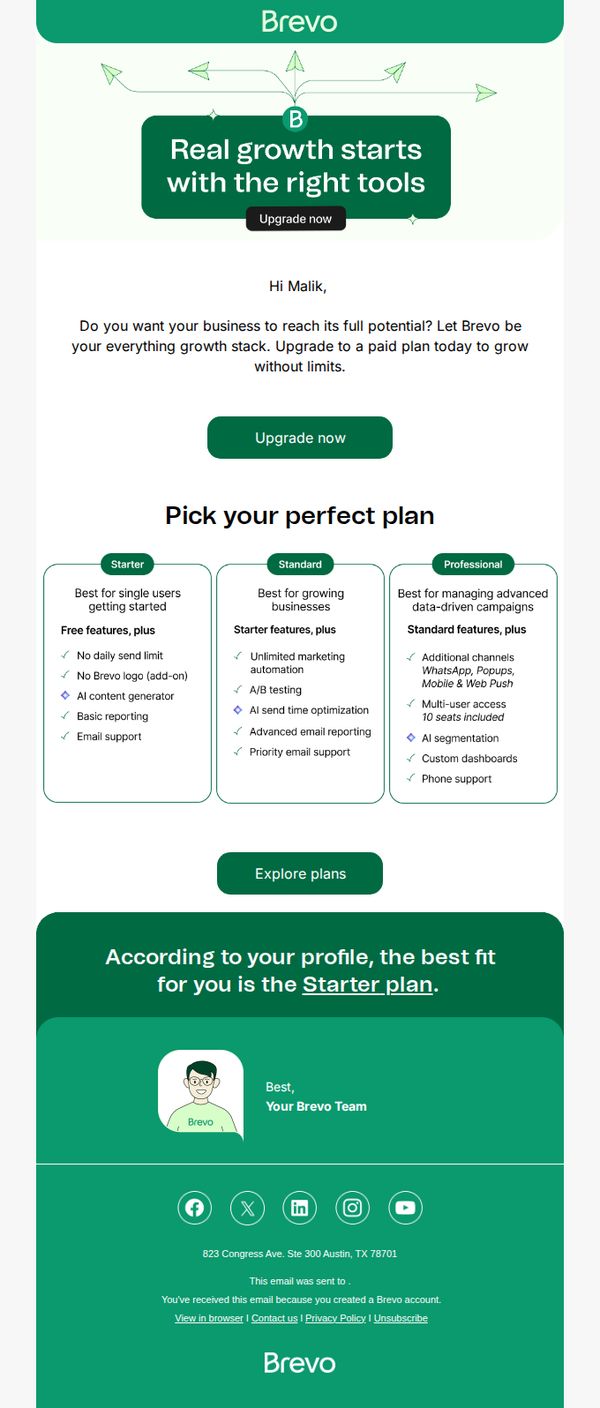
This email aims to convert free-tier Brevo users into paid subscribers by highlighting the growth advantages of upgrading, while personalizing the recommendation to the Starter plan based on the user’s profile to reduce decision fatigue and increase conversion likelihood.
Why this works
The email opens with a benefit-driven headline that ties tool access directly to business growth, creating immediate emotional resonance and positioning the upgrade as a strategic necessity rather than a cost.
How to implement
By recommending a specific plan based on the user’s profile, the email removes friction from the decision-making process, making the upgrade feel personalized, relevant, and low-risk for the recipient.
Pro Tip
Add a subtle countdown timer or urgency indicator near the 'Upgrade now' CTA to nudge procrastinators, since the current design lacks time-sensitive motivation despite promoting a growth-focused upgrade. • Include a short testimonial or social proof near the plan grid, such as '87% of Starter users upgraded within 30 days', to build trust and validate the recommendation, especially for users hesitant about the value proposition.
2. Welcome to Brevo!
Objective
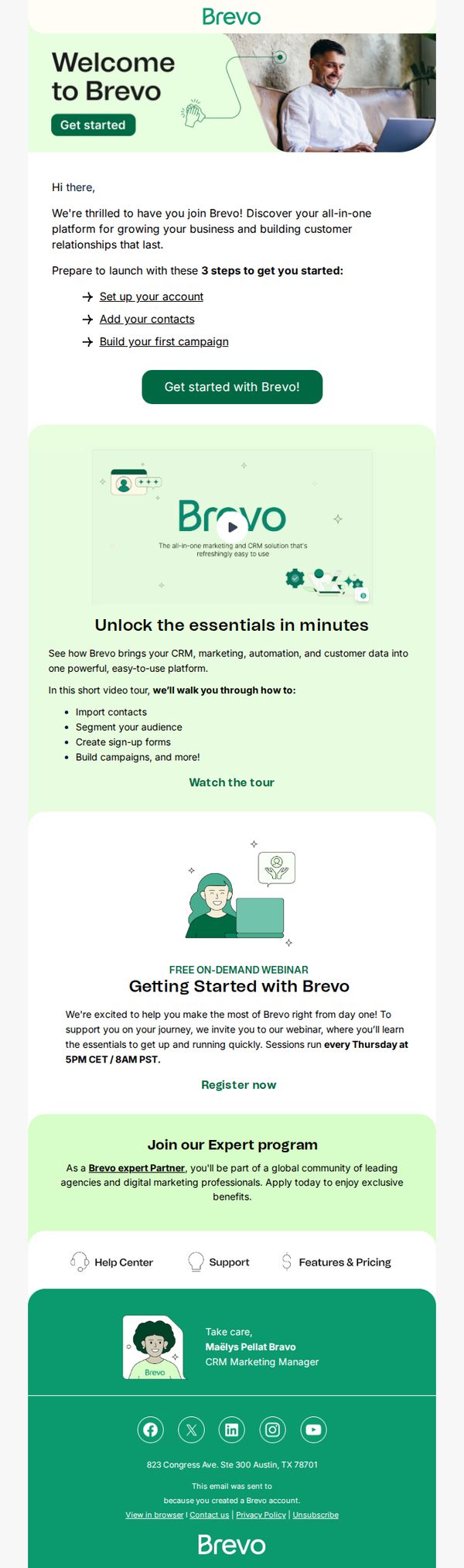
This email aims to onboard new Brevo users by guiding them through their first steps while highlighting key platform features and community benefits. It encourages immediate engagement through video, webinars, and expert programs to reduce early churn and accelerate value realization.
Why this works
The email immediately reduces cognitive load by listing only three essential onboarding steps, making the user’s first actions feel manageable and purposeful rather than overwhelming or ambiguous.
How to implement
By embedding a short video tour that visually demonstrates core functionality, like importing contacts and building campaigns, the brand transforms passive reading into active learning, increasing feature adoption likelihood.
Pro Tip
Add a progress bar or checklist beneath the three onboarding steps to visually track completion, reinforcing momentum and giving users a sense of accomplishment as they move through setup. • Place the primary CTA button ‘Get started with Brevo!’ directly under each of the three steps instead of just once below the list, reducing friction for users who want to act immediately after reading each step.
3. Build your first email in minutes with Brevo Aura, your AI assistant
Objective
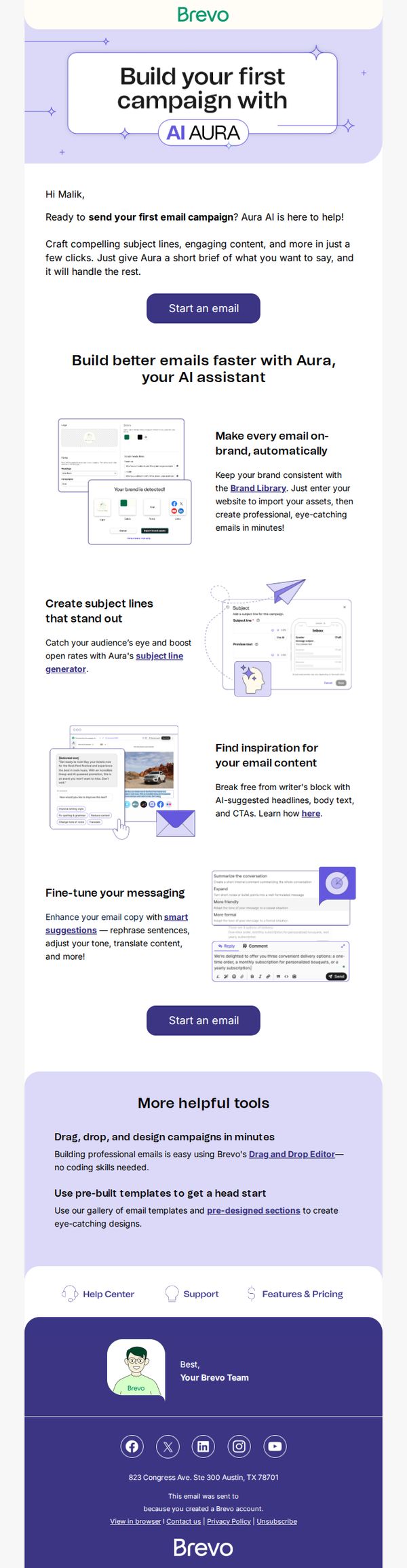
This email aims to onboard new users by showcasing Brevo Aura’s AI-powered features that simplify email creation, encouraging immediate engagement through intuitive tools and brand-aligned design. It seeks to reduce friction for first-time users while positioning Brevo as a smart, time-saving solution for professional email campaigns.
Why this works
Brevo brilliantly reduces intimidation for new users by framing AI assistance as a collaborative partner rather than a complex tool, making email creation feel accessible and empowering from the first click.
How to implement
The email strategically highlights time-saving benefits by emphasizing speed and automation, 'in minutes,' 'just a few clicks', which directly addresses user pain points around complexity and time investment in email marketing.
Pro Tip
Add a subtle countdown timer or progress bar near the CTA to create urgency and guide users through a perceived onboarding journey, reinforcing the 'first email in minutes' promise with visual momentum. • Include a short testimonial or user stat (e.g., '92% of users send their first campaign within 10 minutes') near the second CTA to build social proof and validate the ease-of-use claim with real-world results.
4. Make the most of your Brevo account
Objective
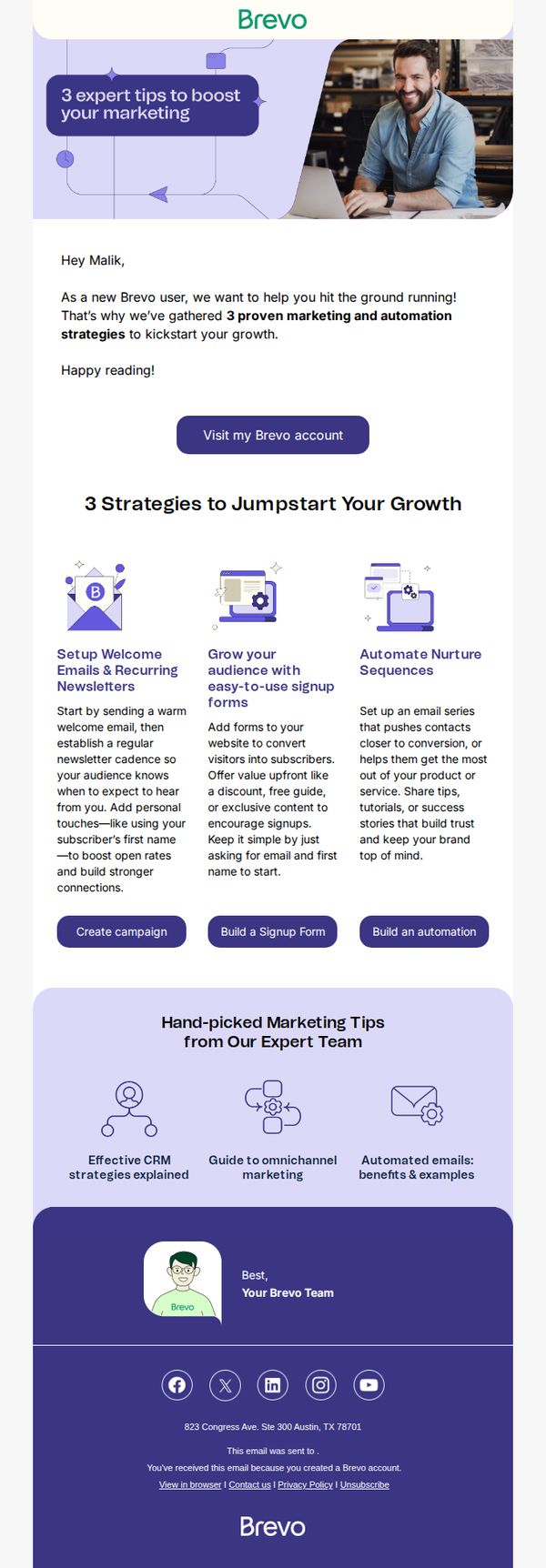
This email aims to onboard new Brevo users by delivering immediate value through three expert-backed marketing strategies, encouraging them to take action within their account and feel confident in leveraging the platform’s core features for growth.
Why this works
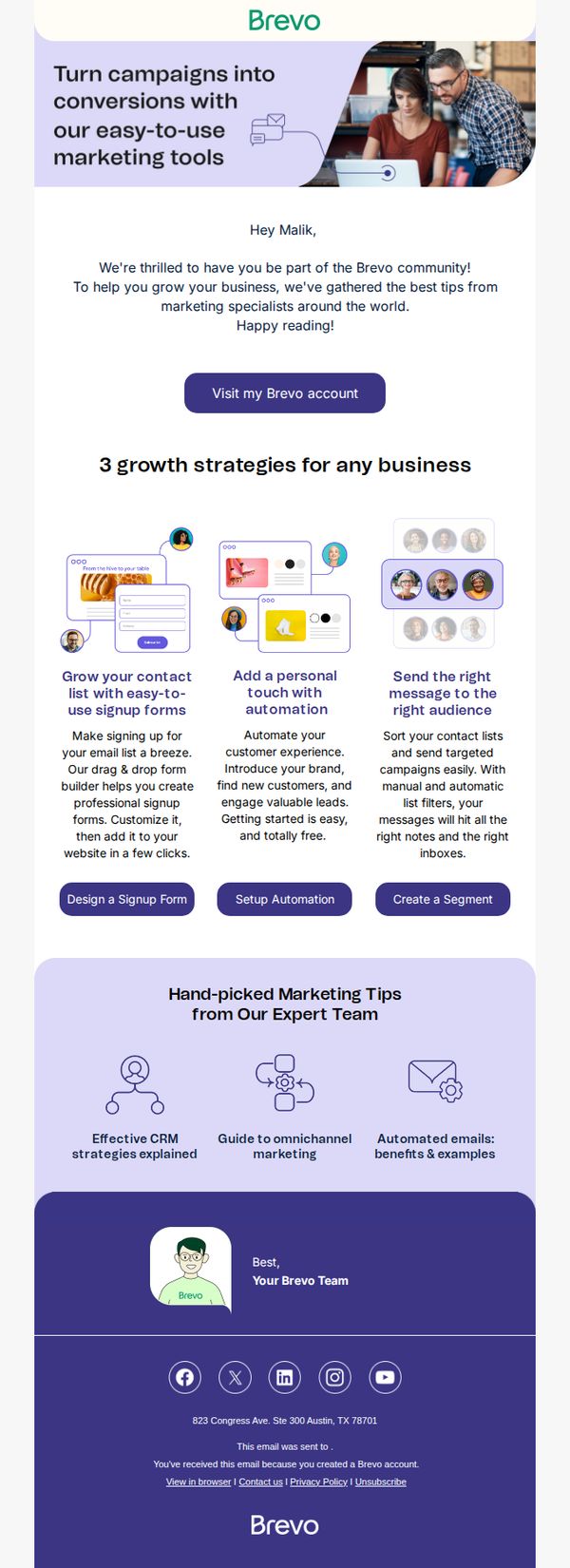
The email opens with a personalized greeting and immediately positions itself as a growth accelerator, framing the content as ‘proven strategies’ rather than generic tips, this builds credibility and urgency for new users who need quick wins.
How to implement
Each of the three strategies is paired with a distinct, action-oriented CTA button that maps directly to the platform’s interface, reducing friction and guiding users from learning to doing without requiring them to hunt for features.
Pro Tip
Add a subtle progress indicator or checklist next to each strategy (e.g., ‘Step 1 of 3’) to visually reinforce the journey and motivate users to complete all three actions, increasing feature adoption. • Include a short testimonial or user stat (e.g., ‘87% of new users who set up welcome emails see 2x open rates’) under each strategy to strengthen social proof and justify the recommended actions with real-world results.
5. Let Brevo do the heavy lifting
Objective
This email aims to welcome new users to the Brevo platform and guide them toward immediate engagement by showcasing three core growth strategies they can implement right away. It positions Brevo as a helpful partner in scaling their business through intuitive, expert-backed tools.
Why this works
The email opens with a warm, personalized welcome that immediately frames Brevo as a community-driven partner, not just a tool, this emotional positioning builds trust before diving into features.
How to implement
Each of the three growth strategies is paired with a clear, benefit-driven headline and a visual metaphor, making complex marketing concepts feel approachable and actionable for beginners.
Pro Tip
Add a subtle progress indicator or checklist after the three strategies to visually reinforce what the user has learned and what’s next, this would reduce cognitive load and increase completion rates. • Include a short testimonial or user stat near the 'Hand-picked Marketing Tips' section to validate the expert advice and build social proof before the user reaches the footer.
6. [Brevo] Complete your registration
![6. [Brevo] Complete your registration](https://nudge-growth-experimental.s3.amazonaws.com/nudge/email-screenshots/4426263.jpg)
Objective
This email aims to guide new users to validate their email address and complete their Brevo account setup, ensuring they can begin sending email campaigns without delay.
Why this works
The email clearly states the purpose upfront, validating the account to unlock campaign-sending ability, which reduces user confusion and increases completion rates by aligning with the user’s immediate goal.
How to implement
Including both a clickable button and a fallback URL ensures accessibility for all users, especially those whose email clients block interactive elements, demonstrating thoughtful UX design that anticipates technical friction.
Pro Tip
Add a subtle countdown timer or progress indicator near the CTA to create urgency and visually reinforce that this is a required step before accessing full platform features. • Include a brief, one-sentence value reminder above the CTA, such as 'Unlock unlimited email campaigns in 30 seconds', to re-anchor the user’s motivation and reduce drop-offs.
7. Step 1: Reach your contacts' inbox 📩
Objective
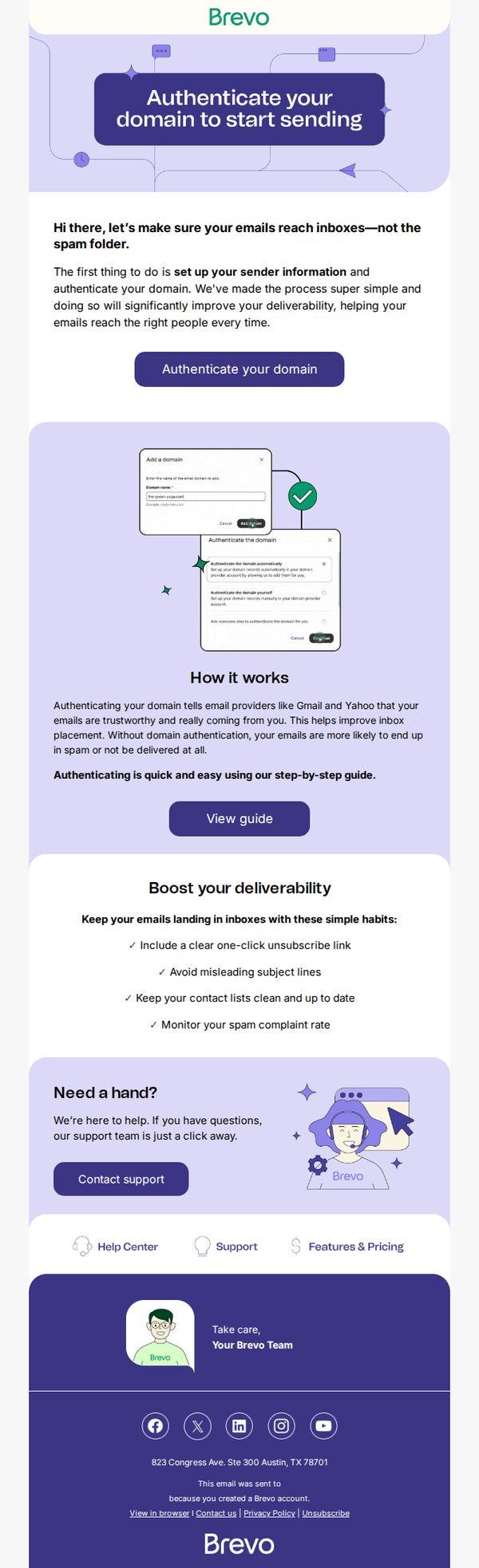
This email aims to guide new Brevo users through domain authentication as the critical first step to ensure email deliverability and prevent messages from landing in spam folders. It reassures users that the process is simple and offers support to reduce friction.
Why this works
The email opens with a clear, benefit-driven headline that immediately answers the user’s unspoken question: 'Why should I do this?' by tying domain authentication directly to inbox placement, a core concern for email marketers.
How to implement
Instead of overwhelming users with technical jargon, the email breaks down authentication into a visual, step-by-step workflow with annotated screenshots, making a complex task feel approachable and reducing cognitive load for beginners.
Pro Tip
Add a progress indicator or checklist showing this is 'Step 1 of 3' to set user expectations and encourage completion of the onboarding sequence, increasing the likelihood they’ll proceed to subsequent setup steps. • Include a brief testimonial or stat like '92% of users who authenticate their domain see 3x higher open rates' to strengthen the value proposition and motivate immediate action with social proof.